Your Zoom pitch shouldn’t freeze and the kids’ 4K stream shouldn’t sputter. By 2026, the typical U.S. home will juggle about 17 connected devices—phones, TVs, cameras, and sensors—all fighting for bandwidth. Speed alone won’t cut it. This guide breaks down six essentials—transparent pricing, unlimited data, right-sized speed, modern Wi-Fi gear, proven reliability, and built-in security—so you can choose an internet provider that stays rock-solid the moment you hit “Join meeting.”
1. Transparent pricing and plan terms
Start with the FCC broadband label
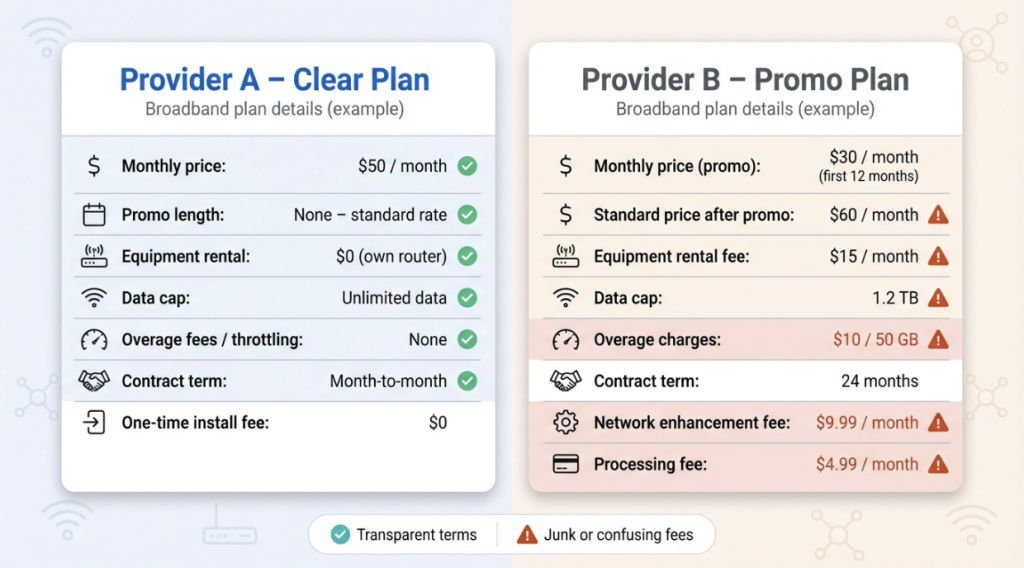
Since April 10, 2024, providers with more than 100,000 subscribers must present a nutrition-style label that lists the base price, promo length, equipment rental, data add-ons, and one-time install fees; smaller ISPs follow on October 10, 2024, according to Reuters. Gather labels from each contender and line them up, then look up how each provider defines the “monthly price” on its own site.
On its own site, WOW! Residential Internet Services spells out “one simple price” with no contracts, hidden fees, or data caps—a promise its FCC label confirms line by line.
WOW!’s broadband label help article notes that, unless a specific exception is listed, the price shown is the standard non-introductory rate, not tied to a 12- or 24-month contract or automatic increase, and that any later price change comes only after written notice. Treat any provider that cannot spell out those details as a red flag and keep shopping.
Spot the junk fees
Line items tagged “network enhancement” or “infrastructure” usually add $5–$15 with no service change. Equipment is a common culprit too: leasing an Xfinity gateway is $14–$15 per month, which is roughly the street price of a Wi-Fi 6E router you could own in a year.
Check the contract language
Legacy cable promos often require a 12- or 24-month term and charge $10 for every remaining month if you leave early. Renters and frequent movers usually save money with month-to-month plans, and some fiber or 5G providers now reimburse early-termination fees when you switch.
Run the two-year math
A flat $50 plan that never increases beats a $30 teaser that doubles after 12 months. Add equipment, data-cap relief, and any mandatory “processing” fees before you compare totals.
Ignore the bow on the box
Gift cards, streaming trials, and bundle coupons are sweeteners, not savings, if the base rate balloons later. Prioritize a price that stays put.
Transparent pricing isn’t about chasing the absolute lowest sticker: it’s about knowing the real bill you’ll see after the honeymoon ends.
2. Data caps and throttling policies
A data cap is a monthly ceiling on how much you can download and upload before fees or slowdowns kick in. The most common limit, 1.2 TB on many cable plans, seems generous until you compare it with real use: the average U.S. home already burns about 640 GB each month, and consumption has been climbing 8–10 percent year over year, according to OpenVault. Add 4K streaming, cloud backups, and hybrid-work calls, and that “plenty” can vanish by week three.
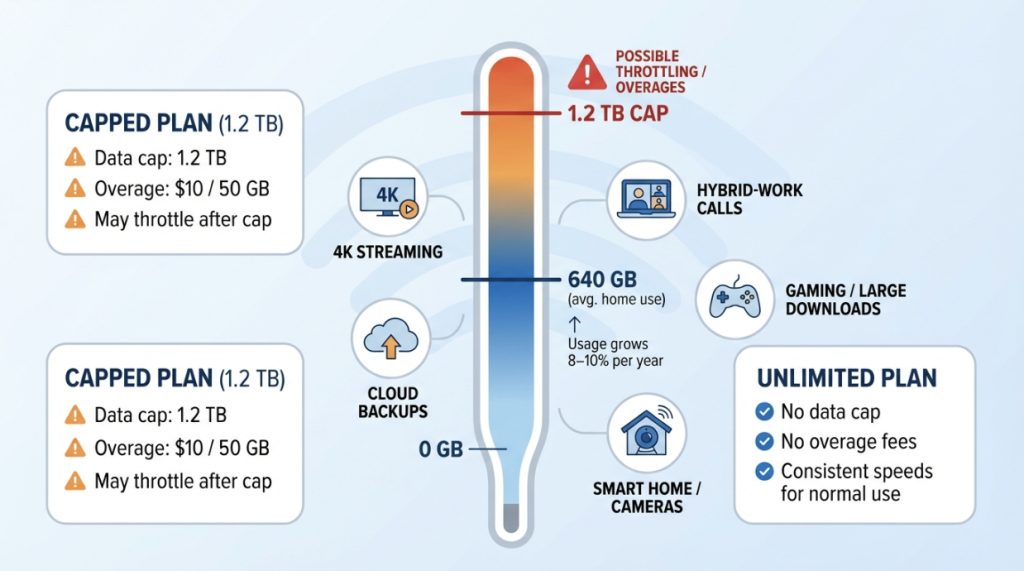
What happens next depends on the provider. Xfinity, for instance, charges $10 for every 50 GB block once you cross 1.2 TB, up to $100 per cycle. Others throttle you to single-digit speeds that turn Netflix into a slideshow. Either way, ordinary households pay the price.
There is good news: more ISPs are ditching caps. Spectrum advertises “NO data caps” on every residential tier, and regional players like WOW! repeat the promise. Unlimited data is proof the network can handle modern demand.
If you can’t avoid a cap, answer three questions before you sign:
- How close does your household come to the limit today?
- Are overages billed ($10/50 GB) or throttled to unusable speeds?
- Can you add unlimited data à la carte without upgrading the speed tier?
Pull six months of usage from your current provider’s portal. If you’ve hit 75 percent of a future cap even once, shop for an uncapped plan. Peace of mind beats any signup gift card because internet, unlike electricity, shouldn’t be metered for normal use.
3. Speed and performance
Internet “speed” blends download, upload, and latency, and all three matter when a houseful of devices goes online.
Size the pipe to your day
Plan on 25 Mbps per 4K stream, 5 Mbps for an HD video call, plus 10 percent headroom. A four-person remote-work family often needs 300 Mbps down / 25 Mbps up; anything less can choke when a 100 GB game patch or cloud backup starts.
Match the technology to the need
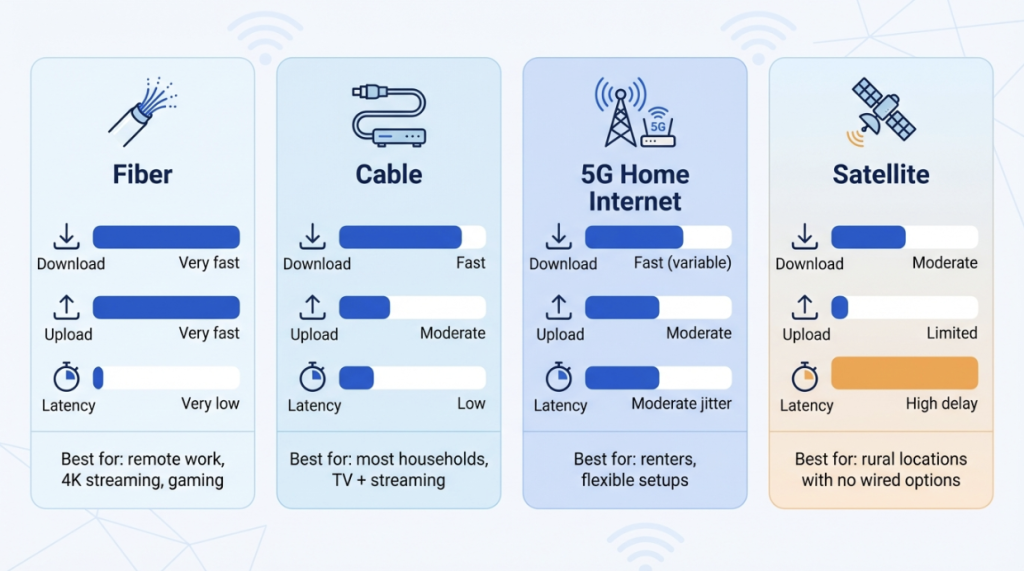
- Fiber: Symmetrical plans with median latency under 15 ms lead most tests. Ookla’s H1 2025 report lists AT&T Fiber at a 364 Mbps national median download, the fastest in the U.S.
- Cable (DOCSIS 3.1 to 4.0): Widely available and now reaching 2 Gbps downloads; uploads stay lower unless the local node gets a mid-split or full-duplex upgrade. Neighborhood congestion can slow evenings.
- Fixed-wireless 5G: Typically 100–300 Mbps down with higher jitter; fine for general use, less ideal for real-time creative work.
- Satellite: Essential in rural zones. Bandwidth is acceptable, but latency often sits above 40 ms, so gamers and traders feel delay.
Validate the marketing
Pull Speedtest Intelligence stats for your ZIP code and ask neighbors how the line holds at 7 pm. Consistency beats a “gigabit” claim that only appears at 3 am.
Think a step ahead
If the budget allows, choose one tier above today’s calculation. Apps grow, kids discover VR, and Wi-Fi 7 devices are coming. Upgrading later can restart promotions or require a new install.
The goal is smooth, low-lag connectivity, so every stream stays crisp and no one asks, “Who’s hogging the Wi-Fi?”
4. Equipment and Wi-Fi technology
Home network hardware is the last mile of your internet connection, and outdated gear can throttle a gigabit line.
Know what comes in the box
Some ISPs include a gateway, but many still charge $14–$15 per month to rent one. In a year that equals the street price of a solid Wi-Fi 6 router you could own. If rental is mandatory, confirm the model supports at least Wi-Fi 6, offers dual-band coverage, and matches your speed tier.
Match coverage to the floor plan
One router can blanket a small apartment; multilevel homes often can’t get full bars. Mesh systems solve this by using small nodes that hand devices off as you move. Several ISPs bundle mesh units with top tiers or for a small fee. If you reboot gear to fix dead zones, mesh usually helps more than buying a faster speed tier.
Consider bringing your own gear
- Cable: choose a modem on the provider’s approved list, DOCSIS 3.1 today or 4.0 for future 2 Gbps tiers.
- Fiber: the ISP’s optical terminal stays, but you can attach any router for extra control over parental filters or firmware. The trade-off is do-it-yourself troubleshooting if a device inside your network fails.
Watch the standard race
Wi-Fi 6E opened a roomy 6 GHz lane in 2024, and early Wi-Fi 7 routers promise multi-gig wireless links and 320 MHz channels, according to The Verge. You don’t need to upgrade on launch day, but choosing hardware with at least five years of life keeps tomorrow’s laptops and VR headsets running at full speed.
Choose gear that can deliver the speed you pay for, through walls, upstairs, and out to the patio, so no one has to ask, “Who killed the Wi-Fi?”
5. Reliability and customer support
Reliability is the share of time your line stays online—at the speed you pay for—when you need it. Fiber networks lead because glass strands ignore electrical noise and rarely sag at peak hours. Upgraded cable can be nearly as steady if the local node is not overcrowded. Fixed-wireless and satellite fill coverage gaps, yet weather or congestion can nudge latency upward, so ask neighbors about real-world outages before you sign.
Numbers back the perception: the 2024 ACSI study gives fiber ISPs an average satisfaction score of 76 versus 68 for non-fiber providers, a gap driven largely by perceived reliability and support quality, according to the American Customer Satisfaction Index.
Even great lines hiccup. When they do, fast help is everything. Look for:
- 24/7 phone or chat—a signal the company knows work does not stop at 5 pm.
- Proactive outage alerts and auto-credits. Some ISPs text the moment trouble hits and issue bill credits after prolonged downtime; others leave you guessing.
- Repair-time guarantees. Business-friendly residential tiers often promise a visit within 24 hours, a useful safety net if you run a home office.
Before committing, stress-test support: call or chat after hours with a basic question such as router compatibility. Long holds or scripted replies today preview the frustration you will feel when the stakes are higher tomorrow.
When speed is equal, choose the provider that answers the phone fastest and fixes problems first—you will forget the extra few dollars the moment a midnight outage is solved in minutes instead of days.
6. Security, privacy and added features
Security keeps malware off your network, and privacy is the promise that your ISP will not sell what you do online. Both can save you money when they are built into the plan.
- Network-level threat blocking. AT&T includes ActiveArmor with its fiber plans; the gateway watches traffic for suspicious patterns and quarantines rogue devices at no extra cost. Comcast’s xFi gateways provide Advanced Security, a feature that blocks malicious sites for more than 18 million customers, also free with the rental gateway.
- Transparent privacy terms. Read the fine print. If an ISP charges to opt out of targeted ads, treat it as a warning sign. Top providers state in writing that they do not sell or anonymize browsing data.
- Perks with real value. Free streaming trials, nationwide Wi-Fi hotspots, or an included mesh node can offset a slightly higher base price. Confirm the perk lasts at least a year and does not lock you into a pricier bundle later.
- Road-map clues. ISPs rolling out DOCSIS 4.0 or multi-gig fiber, or publishing renewable-energy targets, signal stable pricing and fewer surprise upgrades down the road.
Locking in solid security, respectful privacy, and meaningful extras turns internet service from a commodity pipe into something you can trust and enjoy.
How the big providers stack up
Numbers and promises stay fuzzy until they sit in one grid. Use this chart as a quick gut-check before you drill into address-level availability.
| Provider | Network | Advertised download / upload† | Data policy | Contract? | Notable perks |
| WOW! | Cable (DOCSIS 3.1; 4.0 pilots) | 1.2 Gbps / 50 Mbps<br>2 Gbps symmetrical in limited cities | No caps on current residential tiers | Month to month | eero mesh add-on, 30-day money-back guarantee |
| Xfinity | Cable (DOCSIS 3.1 to 4.0) | 1.2 Gbps / 35 Mbps<br>Symmetrical 2 Gbps rolling out | 1.2 TB cap; $10 per 50 GB overage | 1–2 year term for promo pricing | 26 million Wi-Fi hotspots, Peacock trial, xFi Advanced Security with $15 rental |
| Spectrum | Cable (DOCSIS 3.1) | 1 Gbps / 35 Mbps | No caps | None | Free modem, Security Shield, TV streaming app |
| AT&T Fiber | FTTH | 5 Gbps symmetrical in 70+ metros | No caps | None | Wi-Fi 6 gateway, ActiveArmor security, Max (HBO) on select tiers |
| Verizon Fios | FTTH | 2 Gbps symmetrical in select areas | No caps | None | Wi-Fi 6 router, Disney+ bundle, mobile-bundle savings |
† Speeds are “up to” figures; real-world results vary by neighborhood wiring and Wi-Fi equipment.
Conclusion
Quick cues: want truly unlimited data? Skip Xfinity unless you add its $30 unlimited option. Need multi-gig uploads for creative work? Pick fiber. Hate contracts? WOW! or Spectrum fit the bill. Let these rows narrow your shortlist, then verify exact offers at your address.